
Picture a Tuesday morning. It is 5:40am. One of your drivers is on the M6 heading for Birmingham Airport, a flight from Alicante has landed 50 minutes late at Manchester, and there are three unanswered WhatsApp enquiries from last night. If you run an airport transfer business, that probably sounds familiar.
Here is my take. A useful starting question is: how much of the writing, checking and replying that eats the owner’s day can a general-purpose AI tool help with, without an integration project?
AI for airport transfer companies can start with using ChatGPT, Claude or Microsoft Copilot to draft enquiry replies, booking confirmations, collection instructions, complaint responses and marketing copy from details you already hold. You can begin these jobs without connecting the tool to your booking system.
Where the time actually goes
Around every journey sits a collection of administrative jobs: re-typing booking details into a confirmation, explaining meeting points for the fifth time that week, composing a careful reply to a customer whose flight was diverted, and finding time for the proposal to the hotel down the road that asked about a corporate rate.
AI can help produce a first draft of that work. It still needs your facts and your judgement. It does not know your live availability, and it should only use a fare you have supplied or checked against your price list. Keep those boundaries clear and the ten uses below are practical places to begin.
Customer communication: the biggest win
1. Reply to enquiries faster
Give the tool the journey details, your confirmed fare and your vehicle options, and ask for a reply. Email or WhatsApp, in your usual tone. Ask it to flag anything missing, such as the date, passenger count or luggage requirements, rather than filling in the gaps. A prompt, clear reply gives you a better chance of catching the customer while they are still deciding.
2. Create clear booking confirmations
Turn the confirmed booking details into one message covering collection time, flight number where relevant, passenger count, luggage, price and how payment works. Build a template once, then reuse the structure. Check that the draft agrees with your booking record before sending it.
3. Write airport collection instructions
Each airport and terminal is different. Give the tool your verified meeting-point instructions and ask it to make them easier to follow: where passengers meet the driver, how to contact them, and what happens if they cannot find each other. Keep a version per terminal and review it when airport arrangements change.
4. Handle delays, changes and complaints
This is where tired people write things they regret. Give the tool the confirmed facts plus your cancellation, waiting time and refund policies, and ask for a calm, professional response. You decide the outcome and check any proposed offer. The tool helps you express it clearly when you would otherwise be drafting it at 11pm in a mood.
5. Communicate with overseas customers
Draft translations of confirmations and collection instructions into the customer’s preferred language. That can make an unfamiliar airport easier to navigate. Keep names, flight numbers, times and meeting-point labels unchanged, and have important translations checked by someone who speaks the language.
Marketing and reputation
6. Create marketing content
Facebook posts, Google Business Profile updates and seasonal promotions for summer holidays, Christmas travel and business transfers. Give the tool your actual routes, service details and a sense of your voice, then use its drafts to build a manageable content calendar. Check every offer and avoid claims about availability or reliability that you cannot support.
7. Improve the website
Draft useful service pages and FAQs covering airport routes, child seats, luggage allowances, accessibility and early morning collections. Publish answers that reflect the vehicles and services you actually provide. Clear pages help prospective customers assess your service and can reduce the questions you answer by hand.
8. Manage customer reviews
Draft personalised review requests after journeys and replies to reviews, good and bad. Remove identifying details before sharing review text for analysis, then ask for recurring themes. If several passengers mention the same confusing meeting point, that gives you a specific service improvement to investigate.
Running the business
9. Understand which journeys make money
Export booking and cost data to a spreadsheet and ask the tool to help compare routes, including fuel, driver time, airport charges and empty return journeys. File-analysis features vary by tool and plan. Check the inputs, formulas and totals against your records before using the results to change prices.
Separate the contribution from each booking from the business’s overall profit. A fare may cover the outward trip and still leave very little once the empty return is included. Vehicle costs and business overheads also need to be covered.
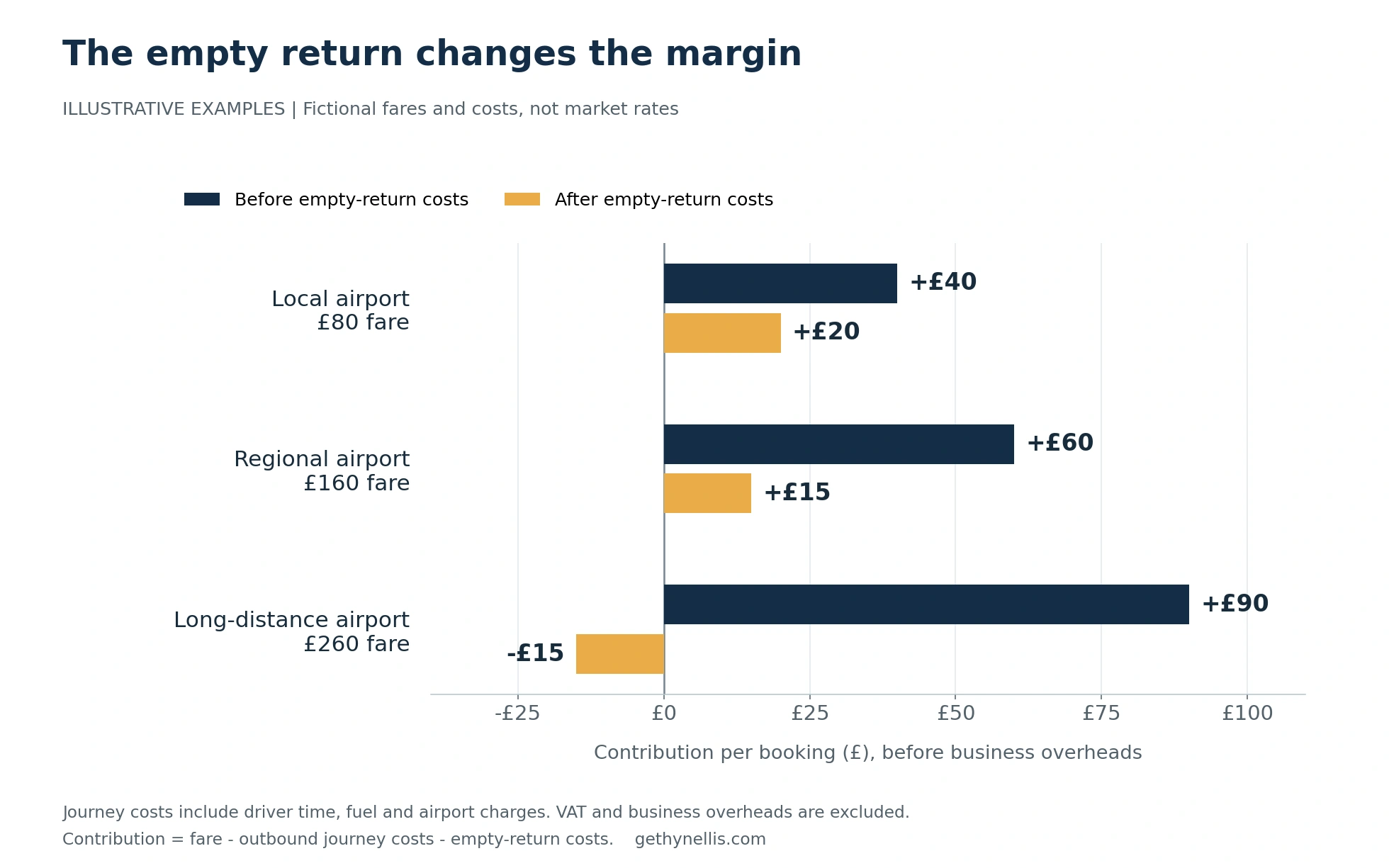
In the fictional long-distance example, a £260 fare less £170 of outward journey costs leaves £90. Add £105 of empty-return costs and the booking contributes minus £15, before overheads. Your figures will differ; the point is to include the whole journey in the calculation.
10. Win corporate and hotel accounts
Draft tailored proposals and introductory emails explaining your service, supported reliability record, invoicing arrangements and account options. Give a hotel or corporate travel manager a clear one-page account proposal they can assess and share. AI can help you finish the document you have been meaning to write for months.
Where to start
Start with enquiry replies, confirmations and collection instructions. They happen regularly, the inputs are already in front of you, and you can check each result. Once those are routine, add complaint responses and marketing.
The prompt frameworks in my book AI That Actually Works provide a structure for briefing the tools. If you want to practise with your team, explore my AI workshops.
Four rules keep this practical:
- Use verified fares, availability, airport instructions and flight information. The tool drafts from the facts you give it.
- Check every draft before it goes out. It is still your name on the message, and you decide whether to confirm a booking or offer a refund.
- Use fictional details while testing. For real work, use a business-approved account and include only the passenger information needed for the task. Keep payment card and passport details out of prompts.
- Treat connecting AI directly to your booking or dispatch system as a separate project, with its own permissions, checks and operating procedures.
Measure the change over a week: time spent drafting, how often you need to correct a message, enquiry response times and whether more enquiries turn into bookings. Put any time you recover into something specific, such as following up quotes or developing account relationships. That is how saved time starts to support the business.
Get the playbook
For a practical way to brief the tools, download The AI Adoption Playbook. It is a free 14-page guide to five prompt frameworks, with worked examples and guidance on introducing them across a team. The download asks for your first name and work email. Choose one framework and use it on a real administrative job.
If you are deciding where AI fits across the wider business, start with my AI Readiness Assessment.